01 — The Overview
In 2024, Bloomberg invested heavily in conversational AI experiences, with plans to further leverage that technology to support additional use cases such as litigation drafting. However, a question-and-answer format does not reflect how lawyers actually think. Legal work is not linear; it is iterative.
I raised this concern with the Chief Product Officer and Head of UX, emphasizing the need to support lawyers beyond standalone chat interactions. By mid-2025, we were given approval to explore an AI-driven, generalized workspace designed specifically for legal workflows.
I owned discovery through evaluation and strategic recommendation, moderating 40+ qualitative interviews, synthesizing findings into product direction, designing and testing lo-fi prototypes, and partnering with Product Leadership to pressure-test scope against business constraints.
Team
- Senior Deign Manager as Research Planner
- Principal Product Manager (and licensed lawyer) as Co-Moderator
- Product Delivery Manager as Recruitment Planner
02 — The Problem
Legal work is a coordination problem disguised as a research problem
Bloomberg Law is one of the most comprehensive legal research databases in the market. But as AI began reshaping legal practice, a question emerged: what does it mean to be a legal intelligence platform when every competitor is building AI tools?
The initial hypothesis was a drafting tool. An AI-powered workspace to help attorneys write legal documents. That hypothesis didn't survive contact with the research.
Pivot Moment
Study 2 uncovered that the developer-built tool did not align with user needs. When findings were presented to the CPO, the entire drafting initiative was eliminated. No user validation existed to justify the build. This saved significant engineering investment from going in the wrong direction. This is what good research is supposed to do. Not confirm assumptions. Redirect them.
03 — The Research
Three studies. 40+ attorneys.
Study 01 · Litigator Workflows · 14 Interviews
The study's objective was to determine a definitive product direction for AI-powered workflow tools for litigators. During the study we learned that litigators spend the most time finding similar briefs with comparable outcomes, exhaustive case research, and switching between tools to complete one task. Their document systems are hard to use and lack collaboration.
Study 02 · Drafting Tool Evaluation · 6 Interviews
We reframed a developer-built drafting tool intended to help attorneys write legal documents. Findings led directly to the CPO eliminating the drafting initiative entirely. No user validation existed to justify the build.
Study 03 · Generalized Workspace · 28 Interviews
Investigated a generalized workspace across litigation, transactional, and in-house contexts. Discovered the major pain points were finding precedence to jump-start projects and analyzing documents while carrying the anxiety of missing critical details. These insights defined the product opportunity that became the workspace platform.
04 — The Insight
Attorney's dont need another tool to learn. They envision AI as a platform that understands all of their tools.
Across all 40+ interviews, two workflows dominated attorney time regardless of practice area: finding exemplary documents with comparable outcomes, and analyzing multiple documents to understand argument structures and precedent patterns.
The surprise was not the tasks. It was the sentiment toward AI. A year prior, most attorneys couldn't imagine mixing AI and legal practice. By the third study, the late adopters were the minority.
Design Opportunity
Attorneys weren't asking for a new tool. Their existing tools were fragmented, hard to use, and poorly collaborative. What they wanted was something that could sit across all of it, interpreting intent, surfacing what was relevant, and reducing the non-billable cost of context switching. Not a destination. An orchestration layer.
05 — The Design Challenge
The design system team was stuck
The Core AI team had been working on the workspace framework for over four weeks. Without user flows or use cases to anchor the work, they had moved directly to interface design, referencing ChatGPT, NotebookLM, and Slack as models. The problem wasn't the references. It was the absence of a legal mental model behind them.
My Approach
The design system team was building a workspace grounded in a three-panel layout, the same direction our four leading competitor took. Something felt off. I visited former attorneys on our team and watched how they arranged their screens. They were context switching in a way I hadn't considered before by expanding and collapsing windows of web browsers and apps, not just clicking through tabs. Every window had space the screen and was within reach. It became clear that encasing and shuffling tools in panels was the wrong model. An adoptable workspace had to mirror how attorneys actually think spatially, not how software typically organizes information.
06 — Design Exploration
An AI platform flow
This is an unsolicited design exploration, not a shipped product. These screens represent a proposed interaction model to offer an AI Workspace as an editable canvas. This interaction design is currently being reviewed in collaboration with the Core AI team.
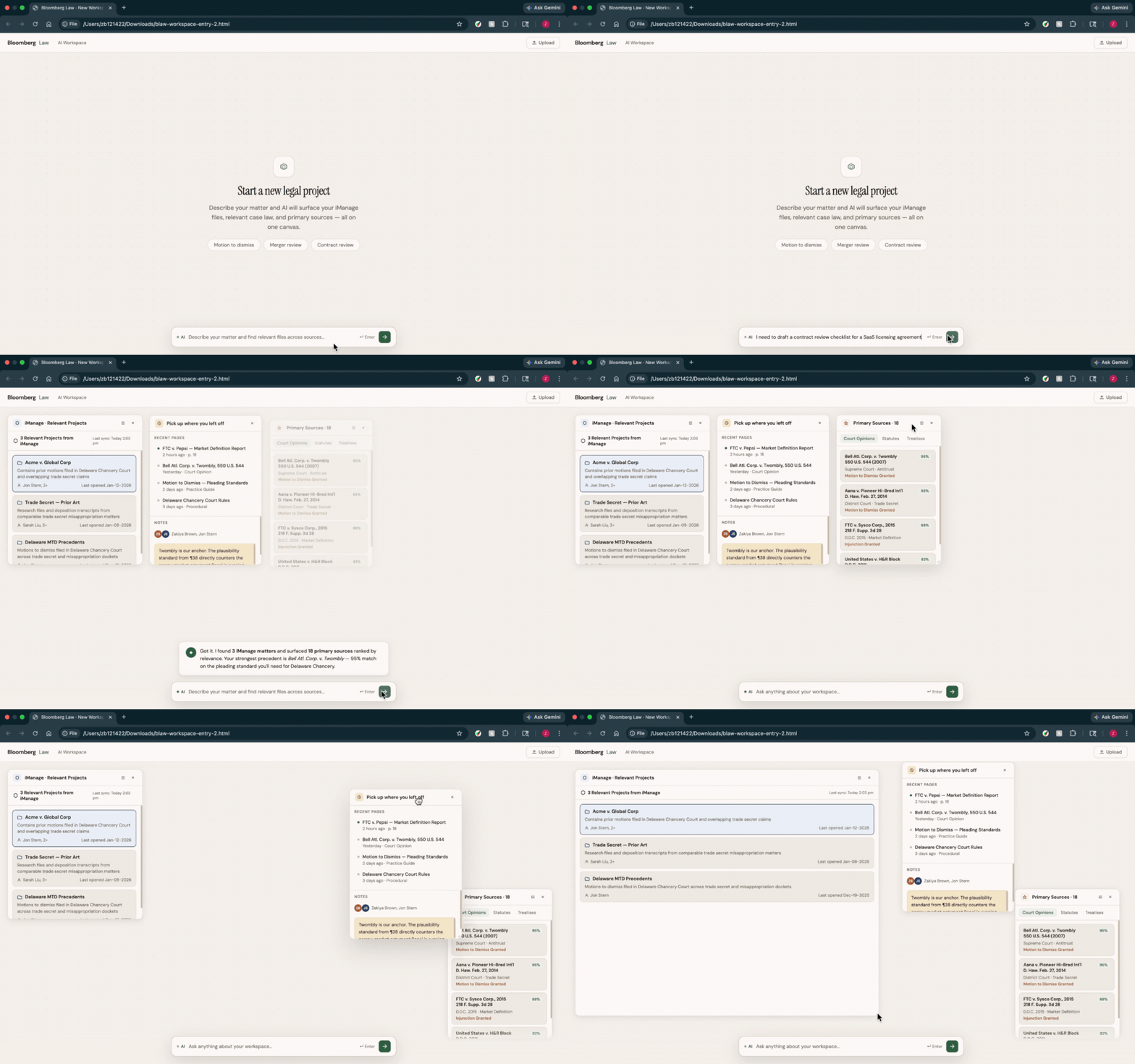
Start Projects With Natural Language Queries
Starting new legal projects is a major pain point. Users spend non-billable hours searching for exemplary documents just to get started. The AI Workspace lets users describe their project in natural language to instantly spin up a workspace, pulling in relevant projects, relevant search history and sources directly onto an editable board.
Document Review and Notetaking Are Now Unified.
Attorneys lose time and billable-hours moving between research tools and pasting research into Word docs. But for them it's a must to take notes throughout the search and analyses phases of their workflow. This interaction explores how they can link sources and reasoning in a unified experience.

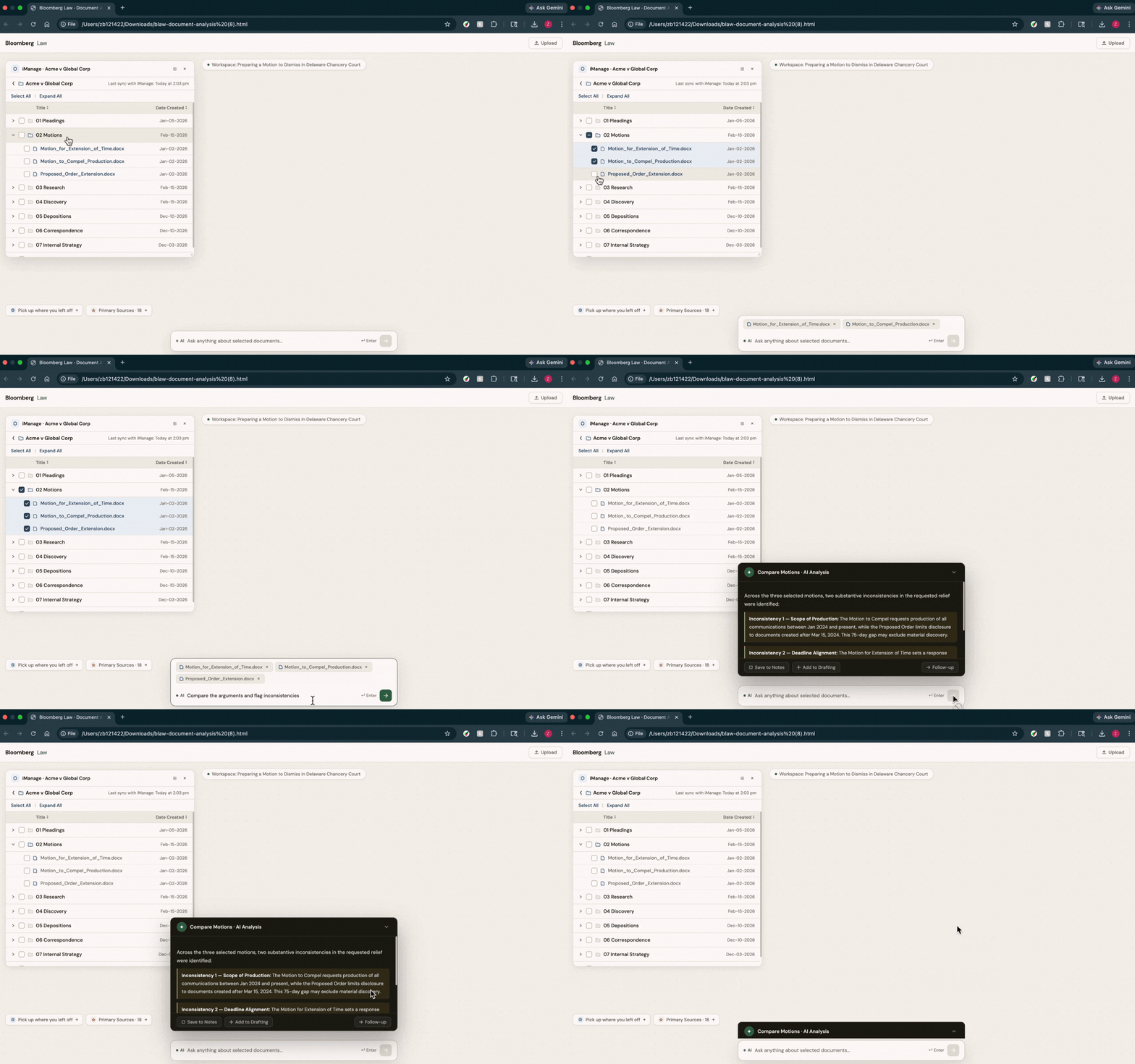
Multi-document (AI) Analysis
Analyzing exemplary documents is time-consuming legal work that attorneys can't bill for. The AI workspace reduces non-billable hours; users can select and analyze multipledocuments integrated from their document management system without leaving the workspace.
Clear space. Keep Context.
As a workspace fills up, staying focused gets harder. Pinning widgets to either edge keeps them within reach while clearing space for the work that needs attention right now.

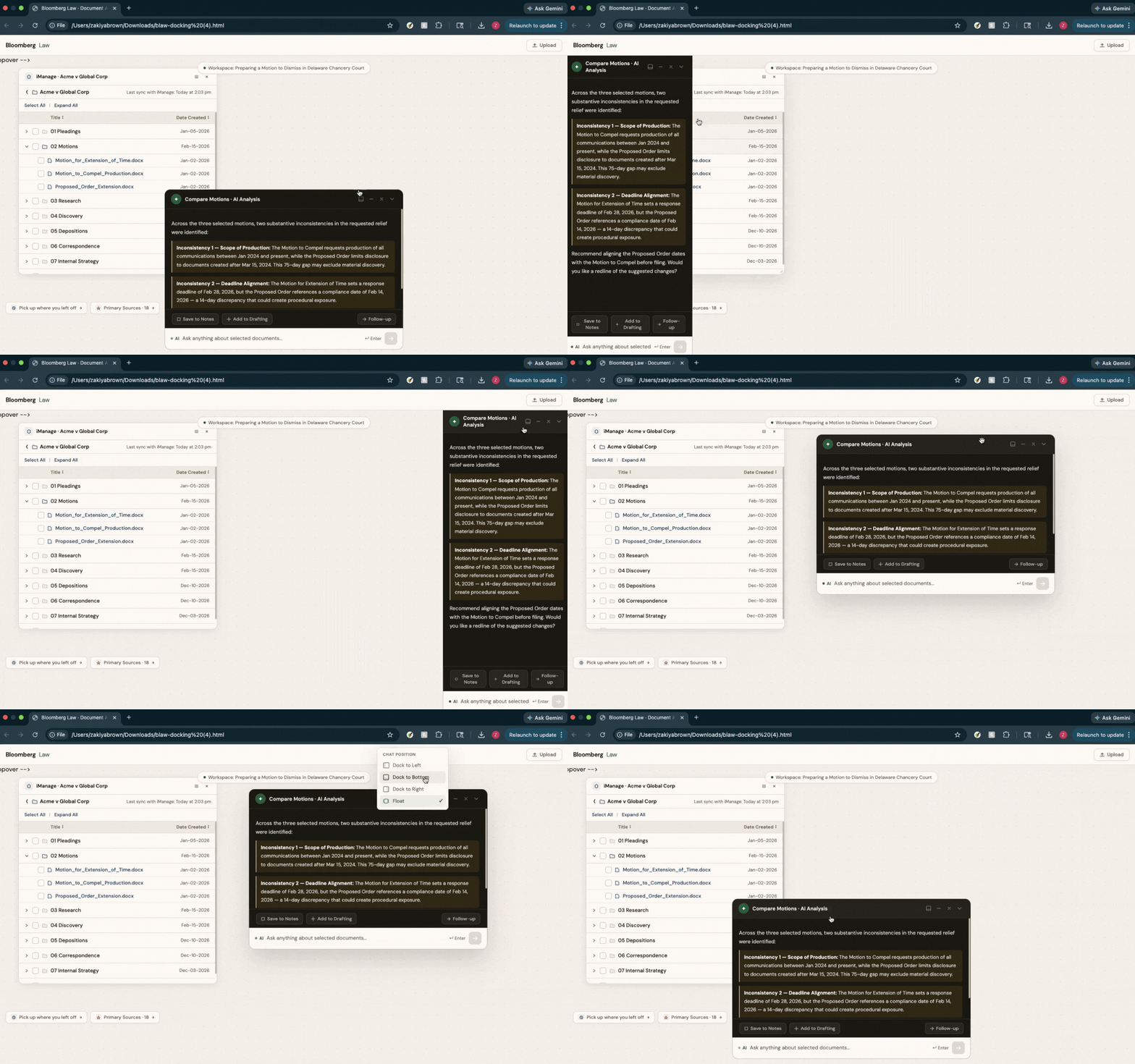
AI Assistant That Moves With Your Workflow
The chat panel is dockable. Users can pin it to the left or right as a persistent sidebar, snap it to the bottom as a traditional input bar, or float it freely anywhere on the canvas.
07 — Competitive Context
Bloomberg Law is entering a crowded market with a unique advantage
AI-First Legal Tools
Harvey, Legora, and Libra solved DMS integration and document sensitivity early. Strong adoption. Weakness: not inherently intelligence platforms. Attorneys report underperformance on research depth.
Direct Competitors
LexisNexis and Westlaw released AI workspace experiences with mixed reception. Users rely on their research collection and document repository tools that create retention and stickiness over time.
Current Status
Bloomberg Law has not yet entered the workspace market and risks falling behind as legal teams adopt AI tools. But it has the research intelligence to win on depth where AI-first competitors fall short. This design exploration of an AI workspace hosted on canvas-based interface mirrors how legal professionals actually work and would be the differentiator in an overcrowded market. The Core AI team is actively working on the workspace framework. These screens are being used to inform the platform currently in development.