
Bloomberg Law's AI Workspaces Research Study
Three research studies, 40+ attorney interviews, and a self-directed design sprint shaped Bloomberg Law's AI workspace strategy from a blank slate.
01 — The Overview
My Role: In 2024, Bloomberg invested heavily in conversational AI experiences, with plans to further leverage that technology to support additional use cases such as litigation drafting. However, a question-and-answer format does not reflect how lawyers actually think. Legal work is not linear; it is iterative.
I raised this concern with the Chief Product Officer and Head of UX, emphasizing the need to support lawyers beyond standalone chat interactions. By mid-2025, we were given approval to explore an AI-driven, generalized workspace designed specifically for legal workflows.
I owned discovery through evaluation and strategic recommendation, moderating 40+ qualitative interviews, synthesizing findings into product direction, designing and testing lo-fi prototypes, and partnering with Product Leadership to pressure-test scope against business constraints. The research reframed the concept multiple times.
Outcome: Identified search and analysis are pain-points across multiple attorney types share, and determined a definitive product direction how AI can play in a role in legal tech.
Team members:
Senior Design Manager as Research Planner
Principal Product Manager (and licensed lawyer) as Co-Moderator,
Product Delivery Manager as Recruitment Planner
02 — The Problem
Legal work is a coordination problem disguised as a research problem
Bloomberg Law is one of the most comprehensive legal research databases in the market. But as AI began reshaping legal practice, a question emerged: what does it mean to be a legal intelligence platform when every competitor is building AI tools?
The initial hypothesis was a drafting tool. An AI-powered workspace to help attorneys write legal documents. That hypothesis didn't survive contact with the research.
PIVOT MOMENT
Study 2 uncovered a developer-built "drafting slate" intended to help attorneys write legal documents. When findings were presented to the CPO, the entire drafting initiative was eliminated. There was no user validation to build it. The research had saved significant engineering investment from going in the wrong direction.
This is what good research is supposed to do. Not confirm assumptions. Redirect them.
03 — The Research
Three studies. 40+ attorneys.
STUDY 01 · LITIGATOR WORKFLOWS · 14 INTERVIEWS
The study’s objective was to determine a definitive product direction for AI-powered workflow tools for litigators. Before starting the study we knew that drafting ≠ writing and it’s a multi-step iterative process. During the study we learned that the litigators spend the most time on finding similar briefs with comparable outcomes, exhaustive case research, and switching between tools to complete one task. Their document systems are hard to use and lack collaboration.
STUDY 02 · DRAFTING TOOL EVALUATION · 6 INTERVIEWS
We reframed a developer-built drafting tool intended to help attorneys write legal documents. Findings led directly to the CPO eliminating the drafting initiative entirely. No user validation existed to justify the build.
STUDY 03 · GENERALIZED WORKSPACE · 28 INTERVIEWS
The objective was to investigate a generalized workspaces across litigation, transactional, and in-house contexts. After two rounds of testing, 18 user interviews and 10 concept tests, we discovered the major paint points across attorney workflows were finding precedence to jump-start their projects and analyzing documents while carrying the anxiety of missing critical details. This insights from this study defined the product opportunity that became the workspace platform.
04 — The Insight
Attorneys don't need fewer tools. They need one tool that understands all of them.
Across all 40+ interviews, two workflows dominated attorney time regardless of practice area: finding exemplary documents with comparable outcomes, and analyzing multiple documents simultaneously to understand argument structures and precedent patterns.
The surprise was not the tasks. It was the sentiment toward AI. A year prior, most attorneys couldn't imagine mixing AI and legal practice. By the time of the third study, the late adopters were the minority. Attorneys were actively imagining AI as a sparring partner: accelerating document review, polishing language, bulk-coding categorization.
DESIGN OPPORTUNITY
Attorneys weren't asking for a new tool. Their existing tools, iManage, NetDocuments, intelligence platforms like Bloomberg Law, were fragmented, hard to use, and poorly collaborative. What they wanted was something that could sit across all of it, interpreting intent, surfacing what was relevant, and reducing the non-billable cost of context switching.
This insight became the design principle for the workspace: not a destination, but an orchestration layer. One task. Many tools. Zero context switching.
05— The Design Challenge
When upstream vision stalls, downstream teams have two choices
The Core AI team — two senior product designers responsible for establishing the visual and interaction direction for all AI experiences at Bloomberg Law — had been working on the workspace framework for over four weeks. Without encouragement to think through use cases and user flows first, they had moved directly to interface design, referencing ChatGPT, NotebookLM, and Slack as their models.
The problem wasn't the reference points. It was the absence of a legal mental model behind them. Bloomberg Law's users are not general knowledge workers. They are attorneys working under billing pressure, document sensitivity constraints, and firm-specific compliance requirements. Generic AI interface patterns weren't going to translate.
MY APPROACH
Rather than sit and wait for a handoff, I returned to what I knew from the research. Attorneys juggle database tools. They habitually keep Word or a writing tool open alongside research. They want AI acceleration on document review specifically, not on writing. The non-billable cost of context switching is a real pain point. I started designing. The first set of screens was complete within a single morning.
06 — Design Exploration
An AI platform flow
This is an unsolicited design exploration and initiative, not a shipped product. These screens represent a proposed interaction model grounded in research findings, currently being reviewed in collaboration with the Core AI team.
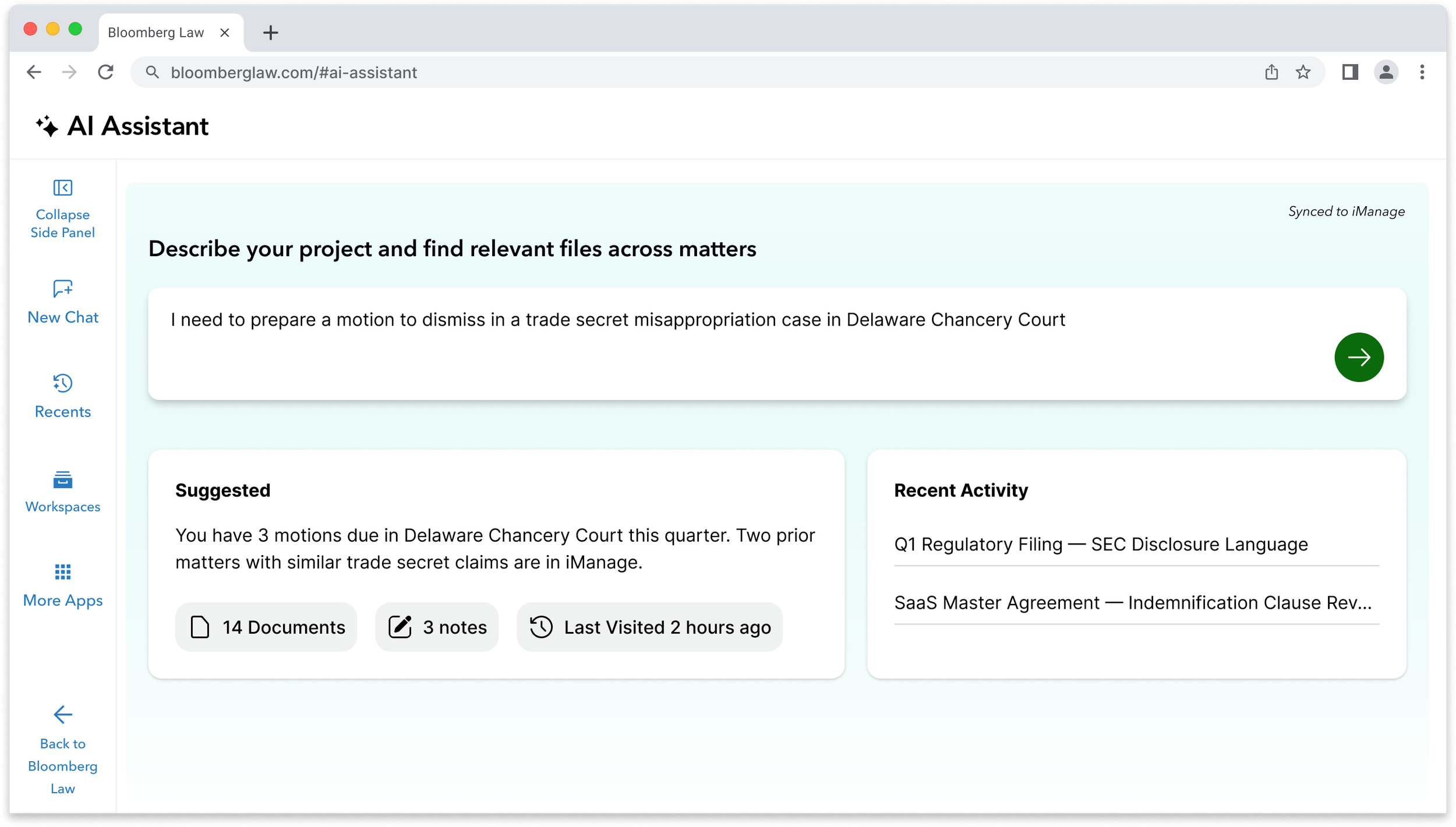
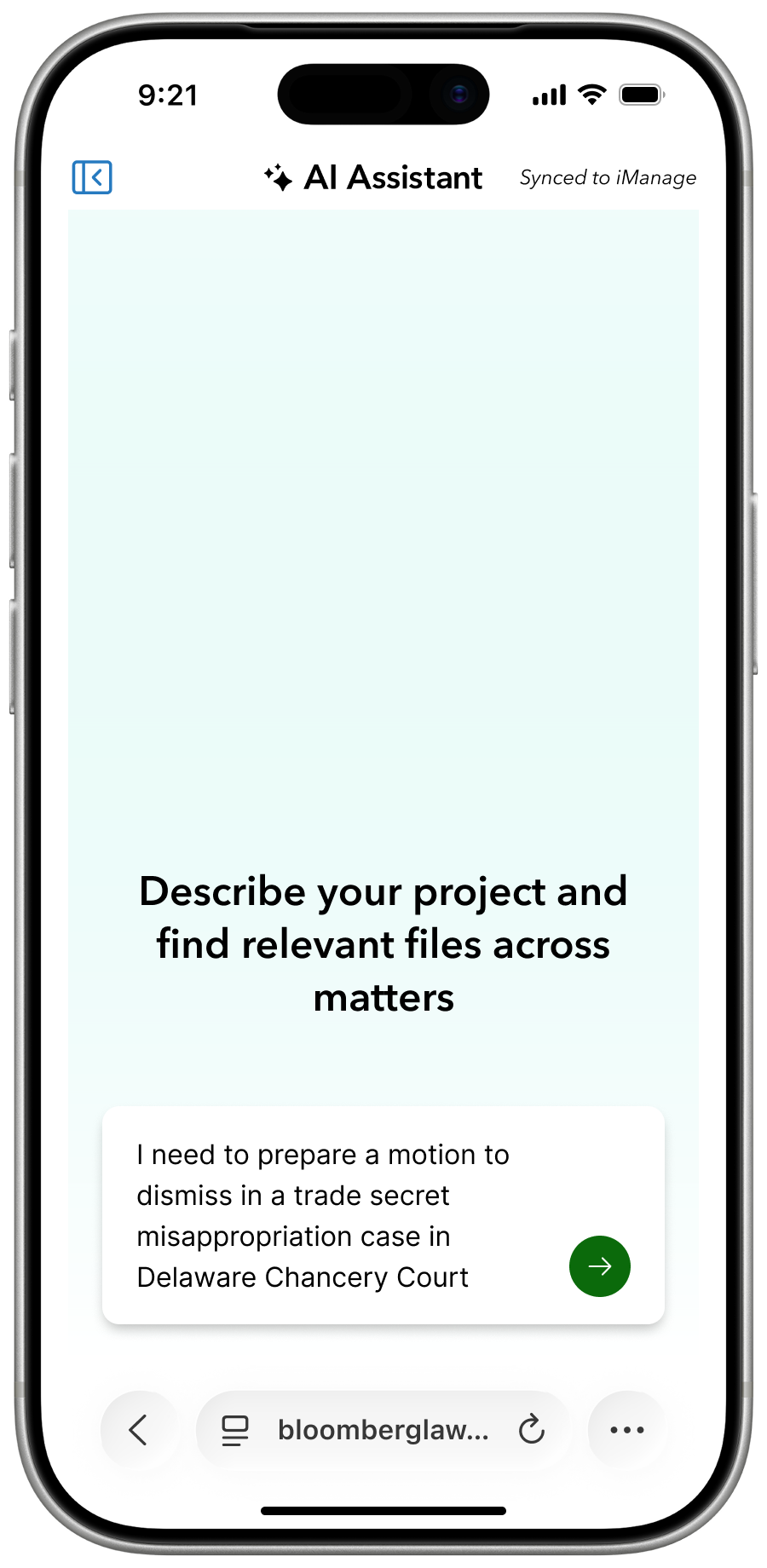
SCREEN 01 · START PROJECTS WITH NATURAL LANGUAGE QUERIES
Natural language as the workspace initiator. Chat-first means the learning curve is already built in — all 40+ attorneys interviewed understand how to use a chatbot. The "Synced to iManage" indicator signals the attorney's own documents are already part of the context before a single keystroke.
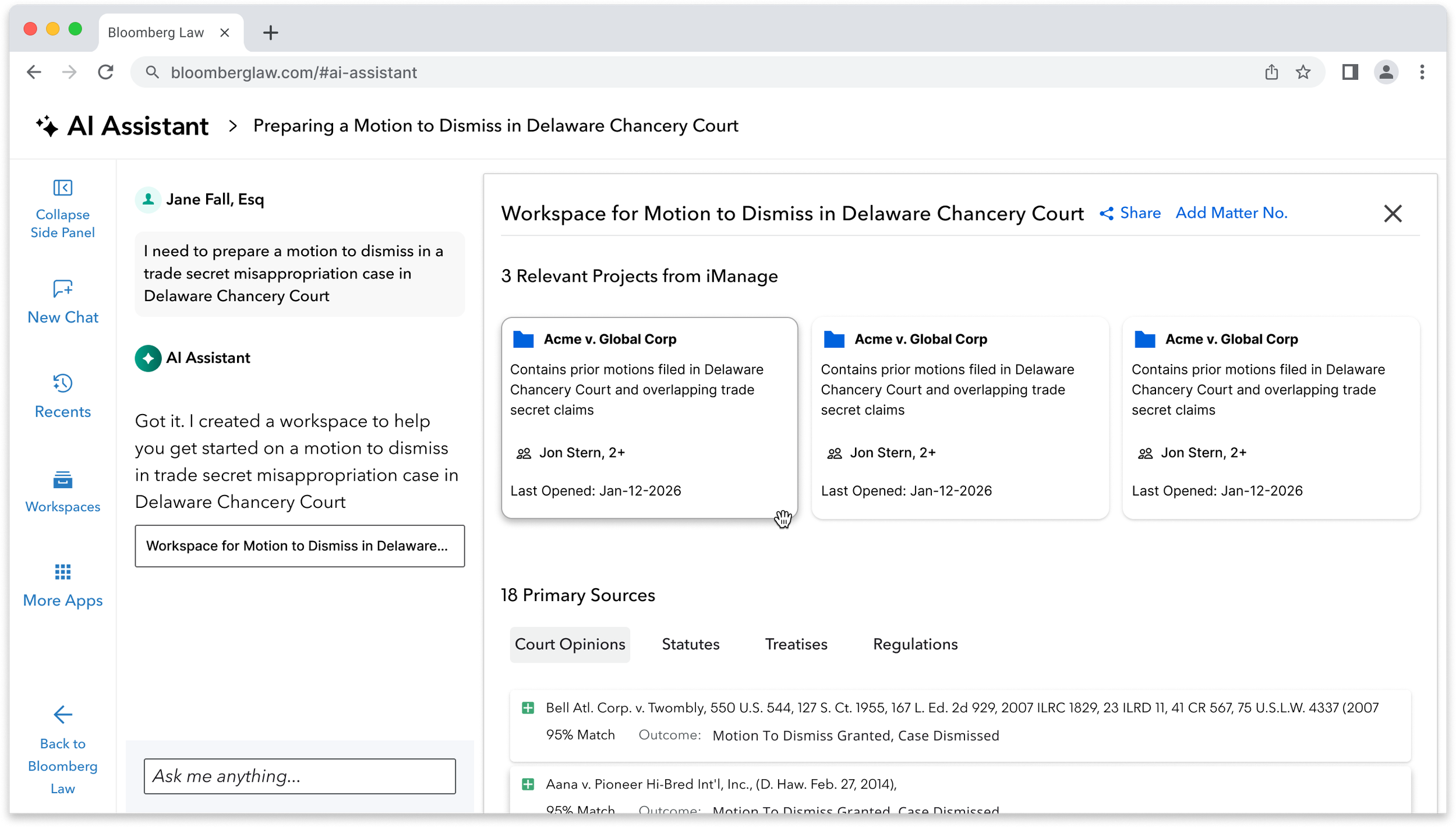
SCREEN 02 · THE ORCHESTRATION LAYER
A single intent surfaces iManage matter history and ranked Bloomberg Law primary sources simultaneously. DMS integration is the biggest adoption hurdle for any legal AI tool. Solving it at the point of intent — rather than as a separate workflow — was a deliberate decision grounded in research.
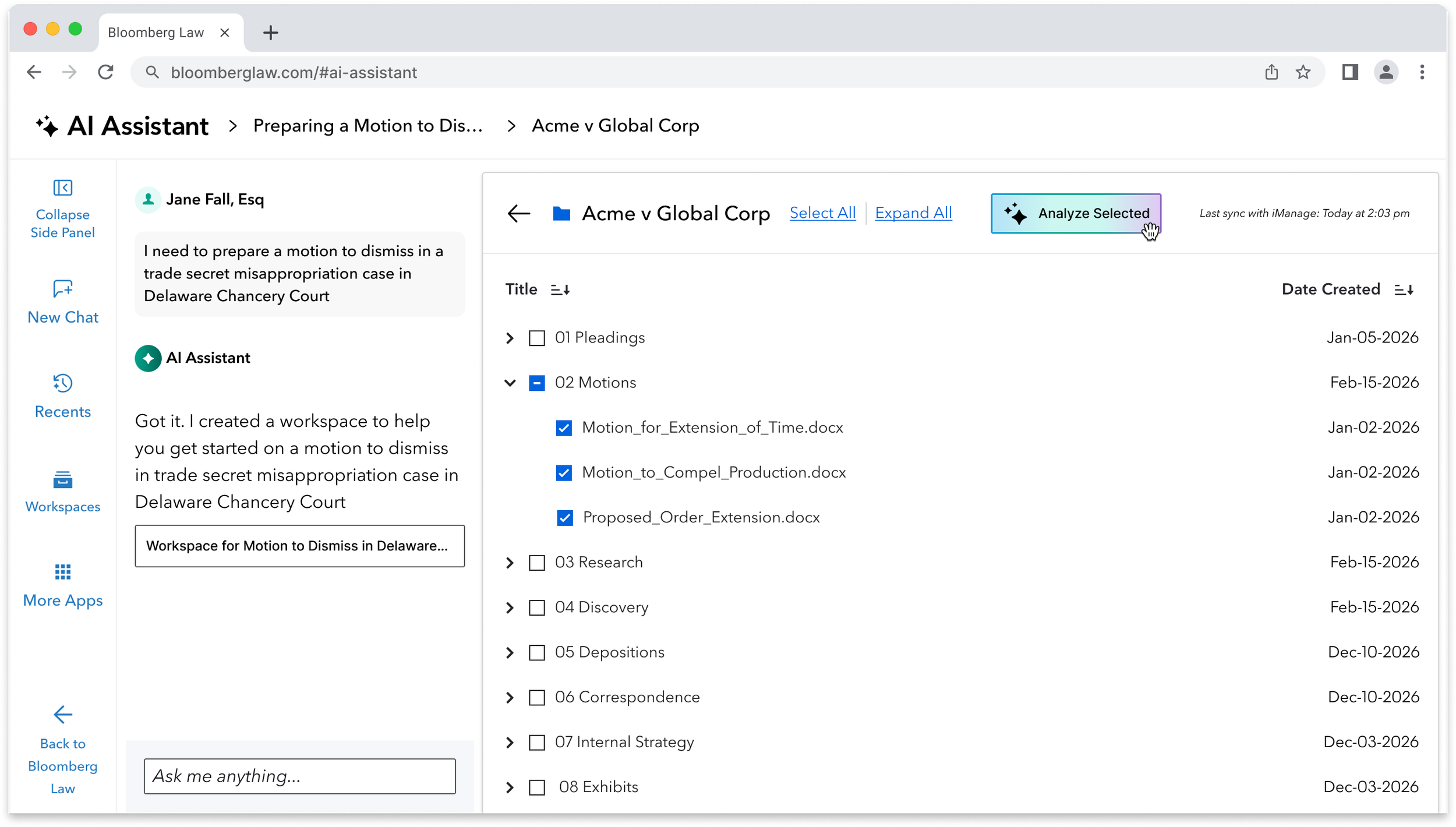
SCREEN 03 · BULK DOCUMENT ANALYSIS
The highest-cost attorney workflow, now actionable in context. The attorney selects documents from an iManage matter and triggers analysis without leaving the workspace. Precedent and motion history, organized, selectable, ready to act on.
SCREEN 04 · CONTEXUALLY AWARE AI
The highest-cost attorney workflow, now actionable in context. The attorney selects documents from an iManage matter and triggers analysis without leaving the workspace. Precedent and motion history, organized, selectable, ready to act on.
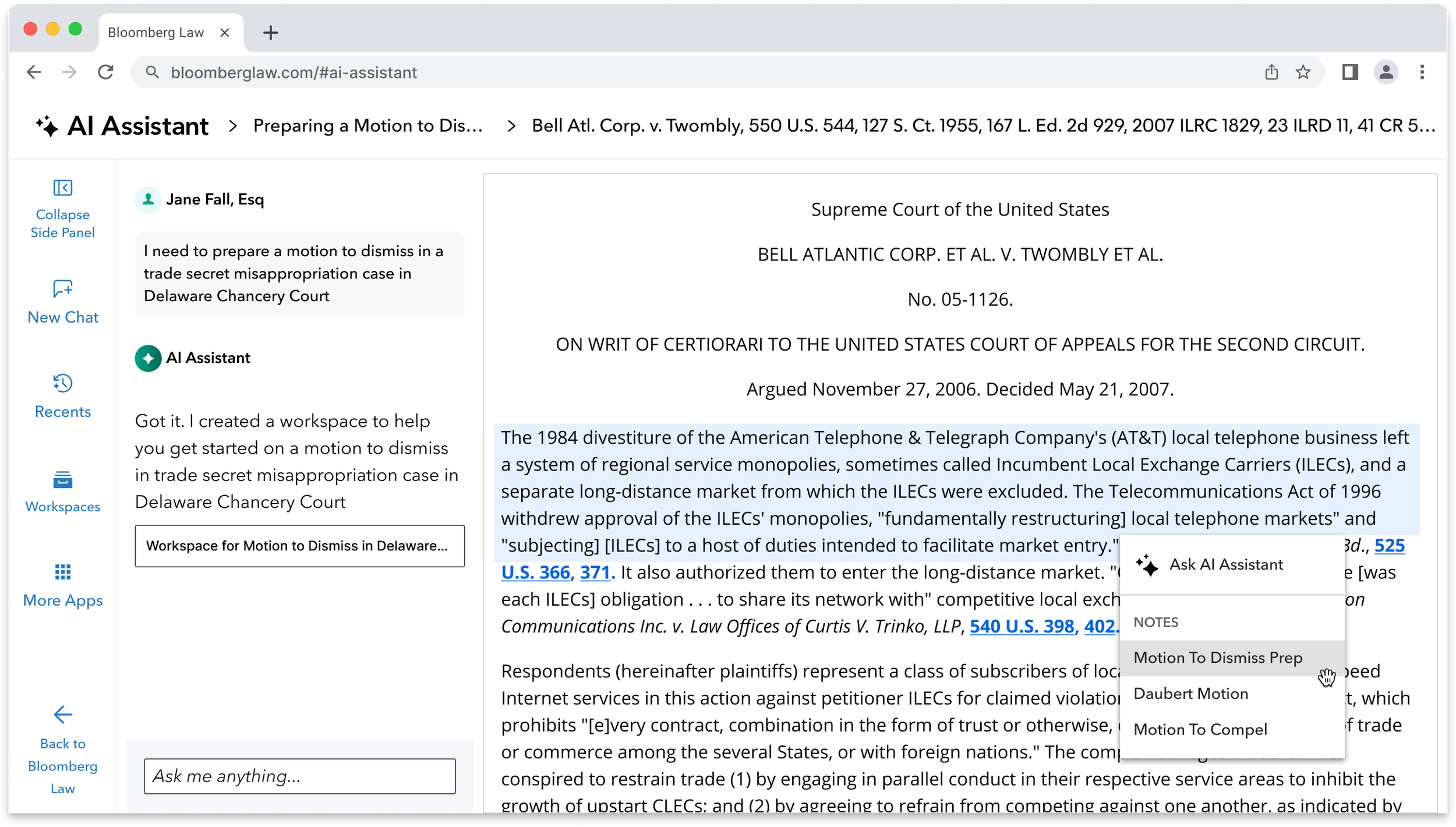
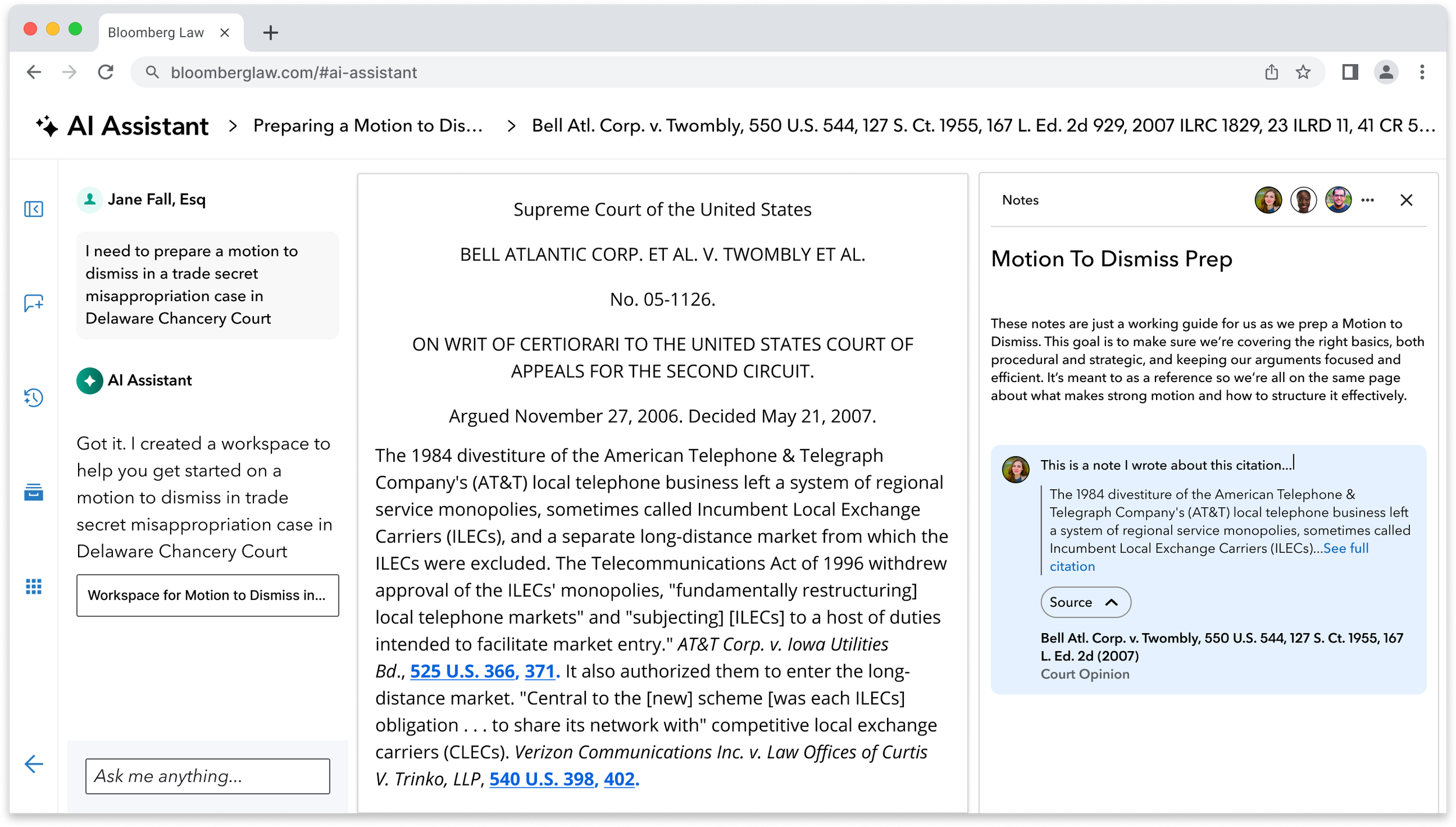
SCREEN 05 · COLLABORATION ACROSS TOOLS
The notes layer closes the loop. Research captured inline, attributed to team members, with the source citation embedded and expandable. The workspace doesn't just help attorneys find things — it helps them build a shared record of what they found and why it matters.
06 — Design Exploration
Scaling the workspace to mobile
After defining the desktop interaction model, I explored how the core workspace flows would translate to mobile. The goal was not to compress the desktop experience but to identify which moments matter most on a smaller screen: initiating a query, reviewing matched projects, selecting documents for analysis, and reviewing AI output in context.
MOBILE VARIANT OF CHAT-FIRST WORKSPACE
 1 / 3
Natural Language Entry
The attorney describes their project in plain language. The AI Assistant interprets the user intention.
1 / 3
Natural Language Entry
The attorney describes their project in plain language. The AI Assistant interprets the user intention.
MULTI-DOC ANALYSIS ON THE GO!
 1 / 2
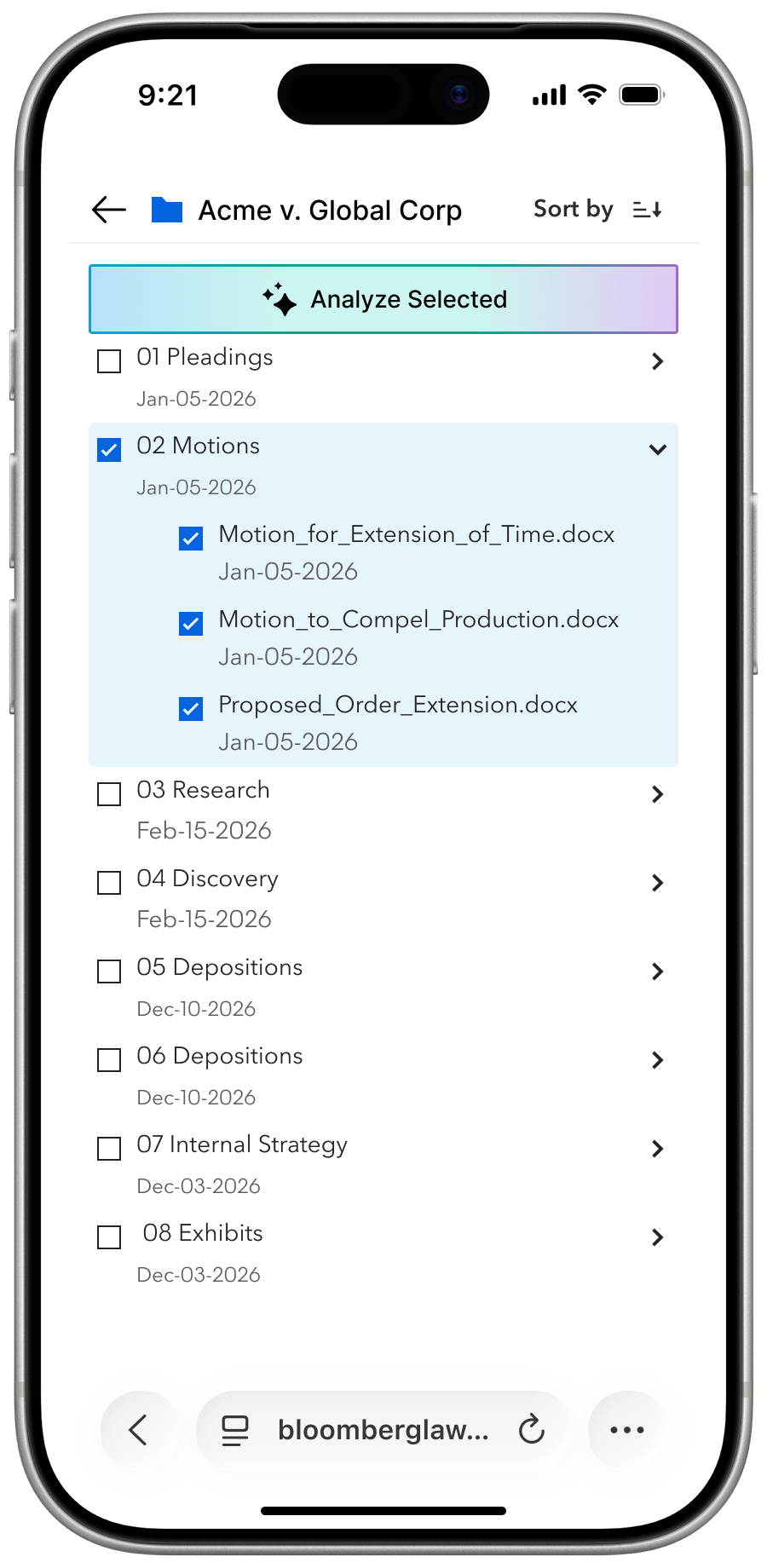
Document Selection
The attorney selects specific documents within projects via integrated DMS, and initiates AI analysis across the selected files.
1 / 2
Document Selection
The attorney selects specific documents within projects via integrated DMS, and initiates AI analysis across the selected files.
 2 / 3
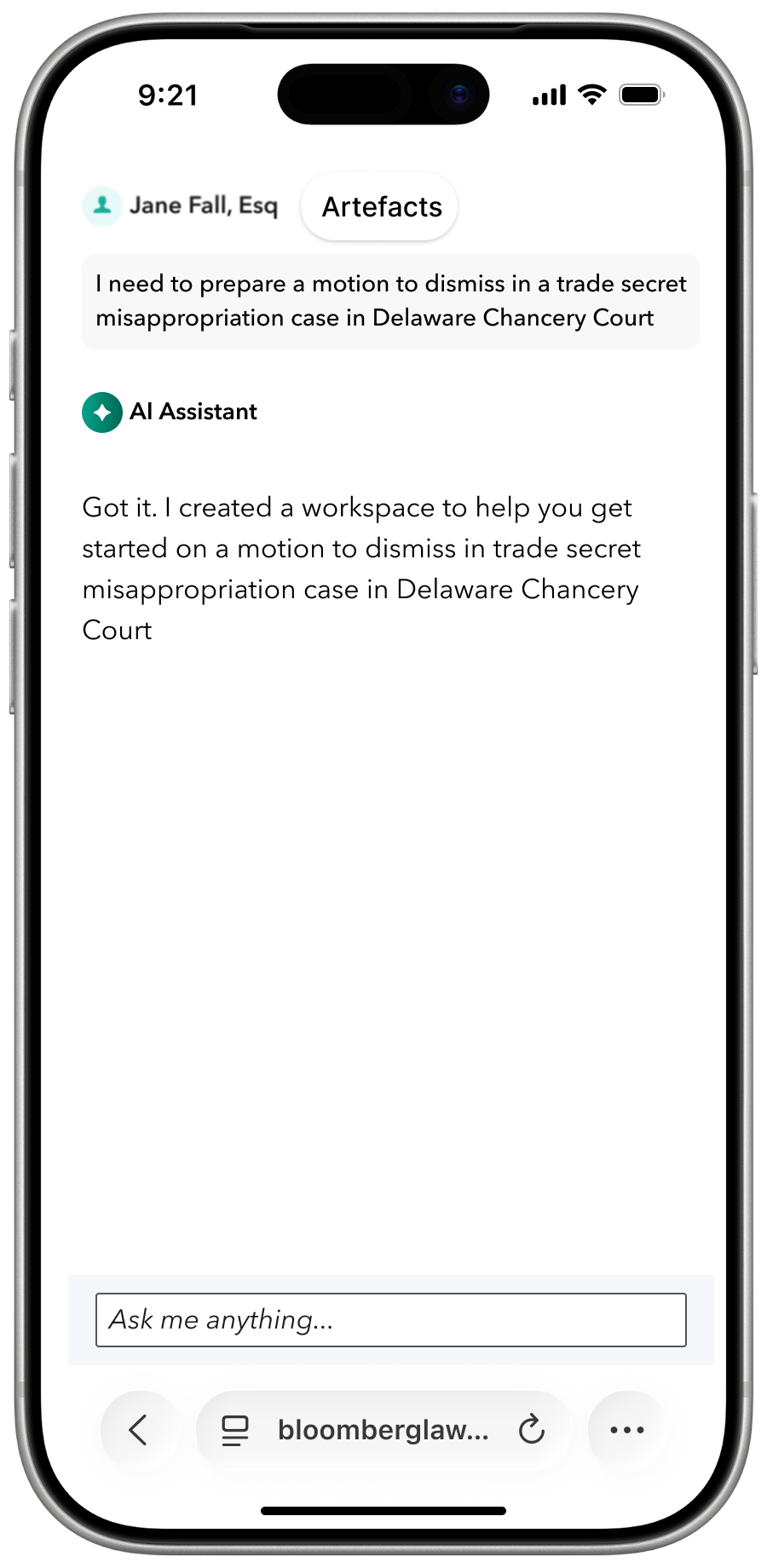
Interpreting User Intent
The AI Assistant predicts the best way to help the user jumpstart the project is to scan integrated databases and Bloomberg Law's library and creates a workspace
2 / 3
Interpreting User Intent
The AI Assistant predicts the best way to help the user jumpstart the project is to scan integrated databases and Bloomberg Law's library and creates a workspace
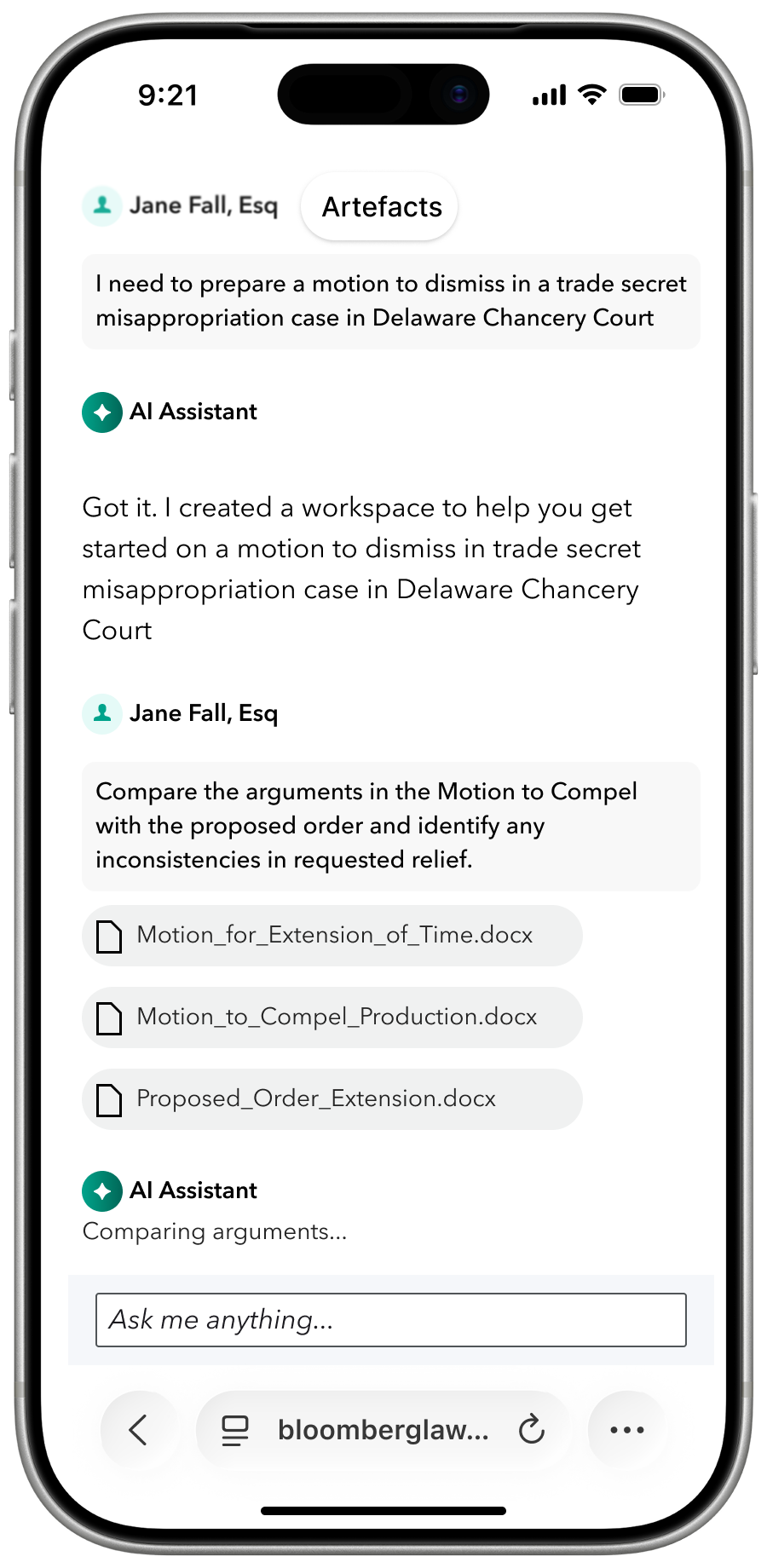 2 / 2
Analysis in Context
The AI Assistant compares arguments across selected documents and prepares to surface inconsistencies inline within the conversation.
2 / 2
Analysis in Context
The AI Assistant compares arguments across selected documents and prepares to surface inconsistencies inline within the conversation.
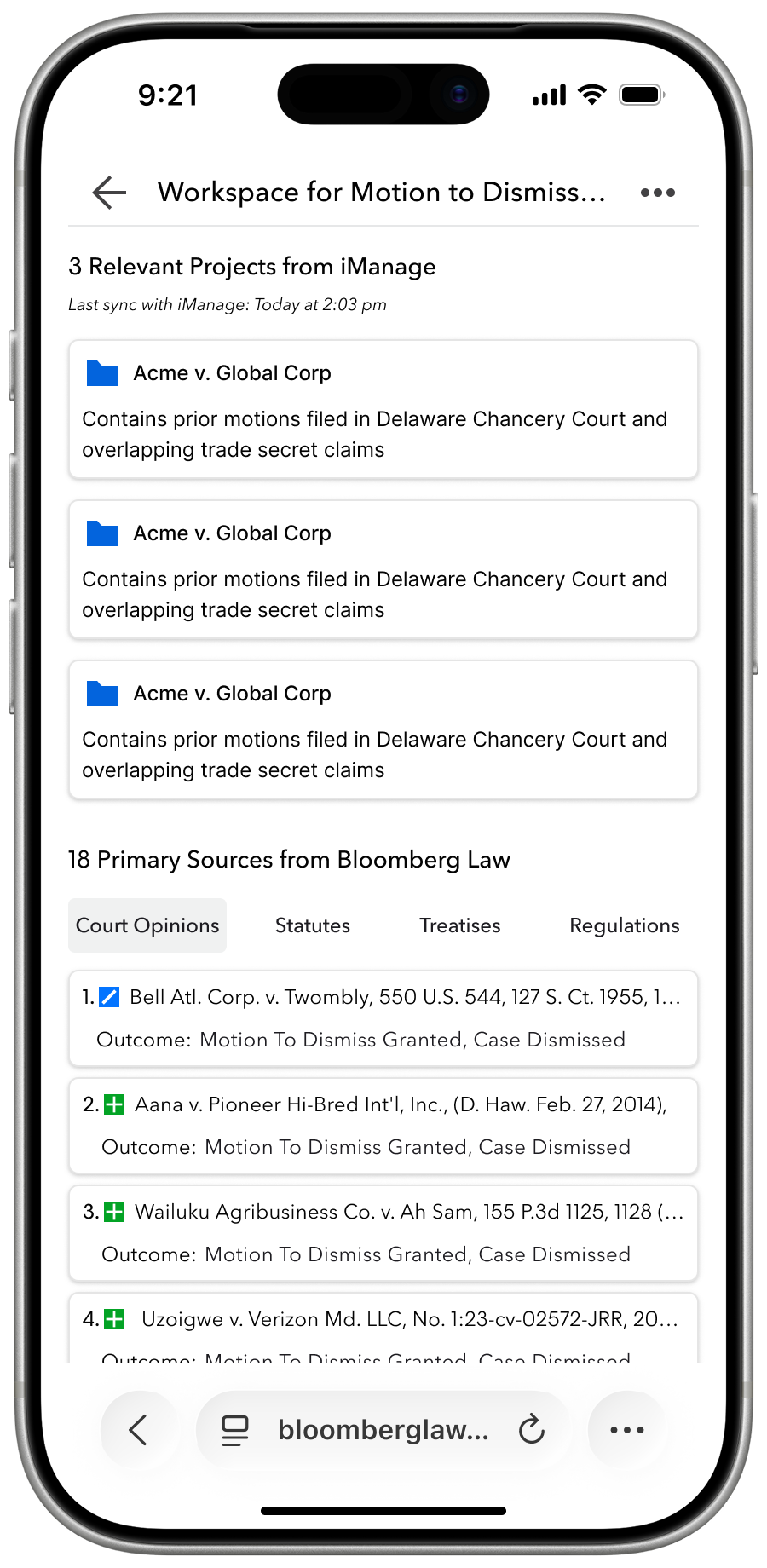 3 / 3
Retrieval of Artefacts Across Databases
AI Assistant surfaces 3 relevant iManage projects and 18 ranked primary sources filtered by source type.
3 / 3
Retrieval of Artefacts Across Databases
AI Assistant surfaces 3 relevant iManage projects and 18 ranked primary sources filtered by source type.
07 — Competitive Context
Bloomberg Law is entering a crowded market with a unique advantage
The legal AI workspace market has moved fast. Bloomberg Law's competitive position depends on whether it can act on its core differentiator: being an intelligence platform, not just a productivity tool.
AI FIRST LEGAL TOOLS
Harvey, Legora, and Libra solved DMS integration and document sensitivity early. Strong adoption. Weakness: not inherently intelligence platforms. Attorneys report underperformance on research depth.
DIRECT COMPETITORS
LexisNexis and Westlaw released AI workspace experiences with mixed reception; however users rely on their research collection and document repository tools that create retention and stickiness over time.
CURRENT STATUS
Bloomberg Law has not yet entered the workspace market and risk of falling behind as legal teams adopt AI tools. But has the research intelligence to win on depth where AI-first competitors fall short. This design exploration is a self-directed initiative developed to advance the workspace interaction direction. The Core AI team is actively working on the workspace framework. These screens are being used to inform the platform currently in development.
See how I designed an one-click GenAI experience on Bloomberg Law’s most used page.