01 — My Role
Role
Sole designer of an AI-assisted citation verification tool that analyzes legal documents so attorneys can catch errors before they file.
Multiple Teams
Legal Workflow Designer (me), 3 Core Product Designers, 2 Product Managers, 3 Engineers
Time period
Summer 2026
Outcome
The interaction patterns established here have since been adopted by other business units at Bloomberg, and the agent is built to scale as a reusable step across broader legal agentic workflows on the platform.
02 — The Problem
Law firms require attorneys to use citation checkers.
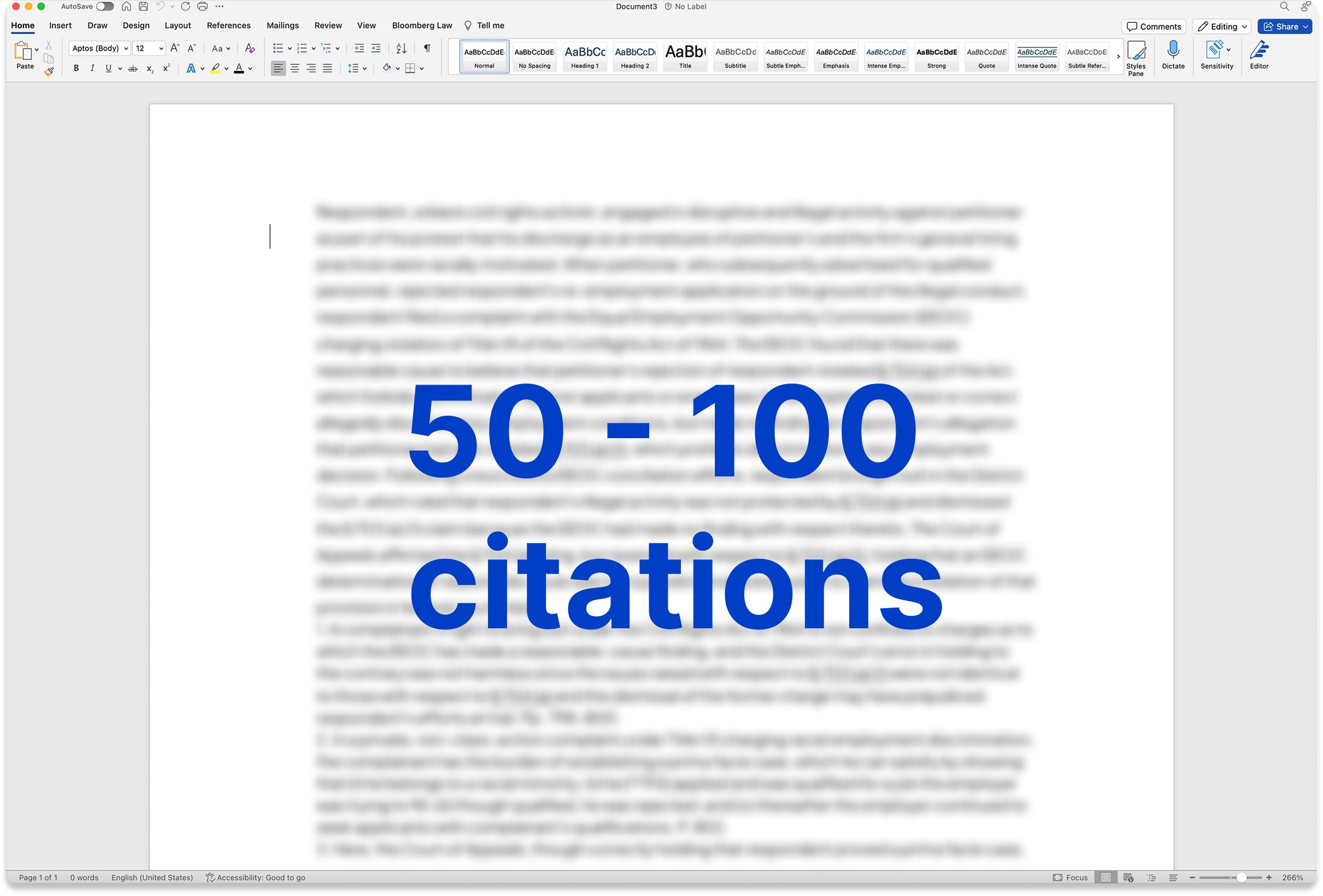
Law firms are worried about filing legal documents with hallucinated citations.Legal documents typically include 50 to 100 cited sources or citations. Every source must be verified before submitted to the court. Plus, the law is always changing, so what was a solid supportive source two months ago could no longer support an attorney's argument.
The citation checking process is slow, manual, and leaves significant room for error.
03 — The Brief
Where we started
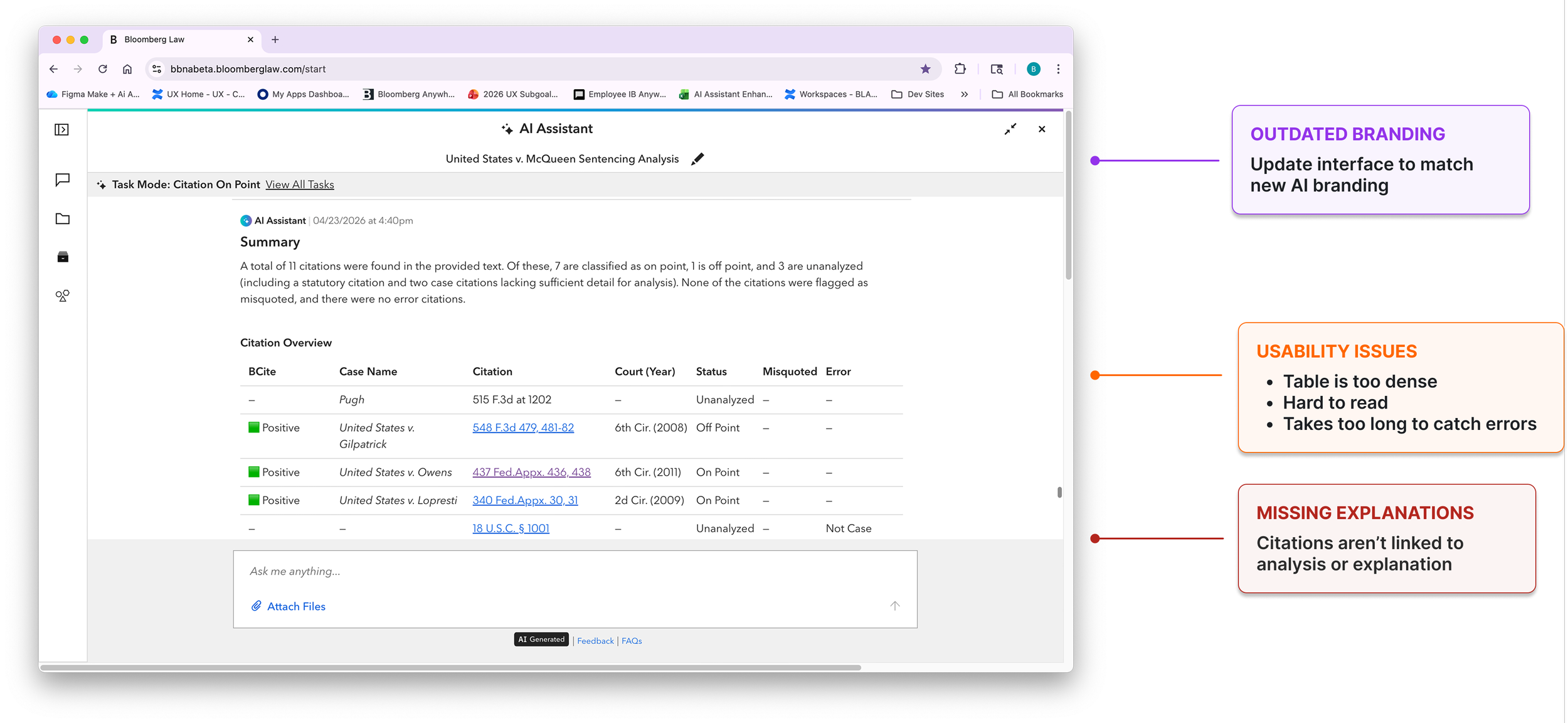
A PM built a beta that extracted citations and checked each one for accuracy, quote fidelity, substantive support, and case quality via BCite. It worked, but the table was dense, the analysis was disconnected from the citations it described, and there was no way to triage. Attorneys would still need to read nearly every row.
04 — Refining the Table
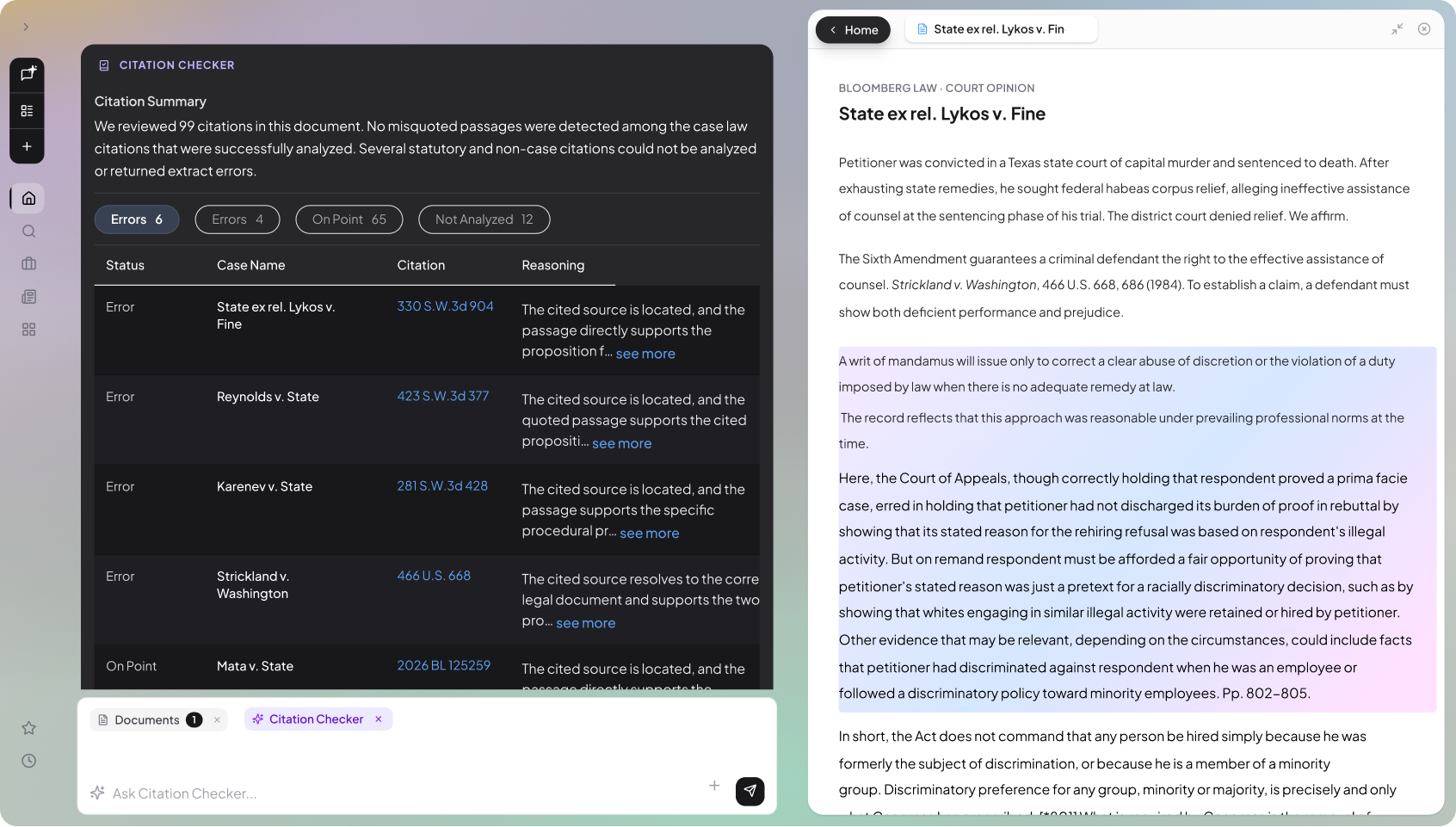
I simplified the PM's table, twice.
First round: I simplified the table into a filterable list. I cut unnecessary columns and moved it into the panel to align with the AI mode's new architecture. I added an analysis column so the explanation sat next to the citation it described.
Second round: I kept the filters but brought the table back into the chat, which was a lighter build.

Round 1: Panel-based table, aligned with the AI Assistant's new architecture.
Round 2: In-line table, brought back into the chat as a lighter build.
05 — Research
A large law firm's feedback about the citation table.
My PM arranged a feedback call with a large law firm. They agreed to talk to us because they already use another document analysis tool of ours called Brief Analyzer, and they wish it could check citations.
Overall, their feedback was positive. They liked the interface and said it was easier than reviewing a table in Word or Excel. And they gave me a list of improvements: color coding on the filters, progress indicators so they could mark which citations they'd reviewed or flagged, and an export function.
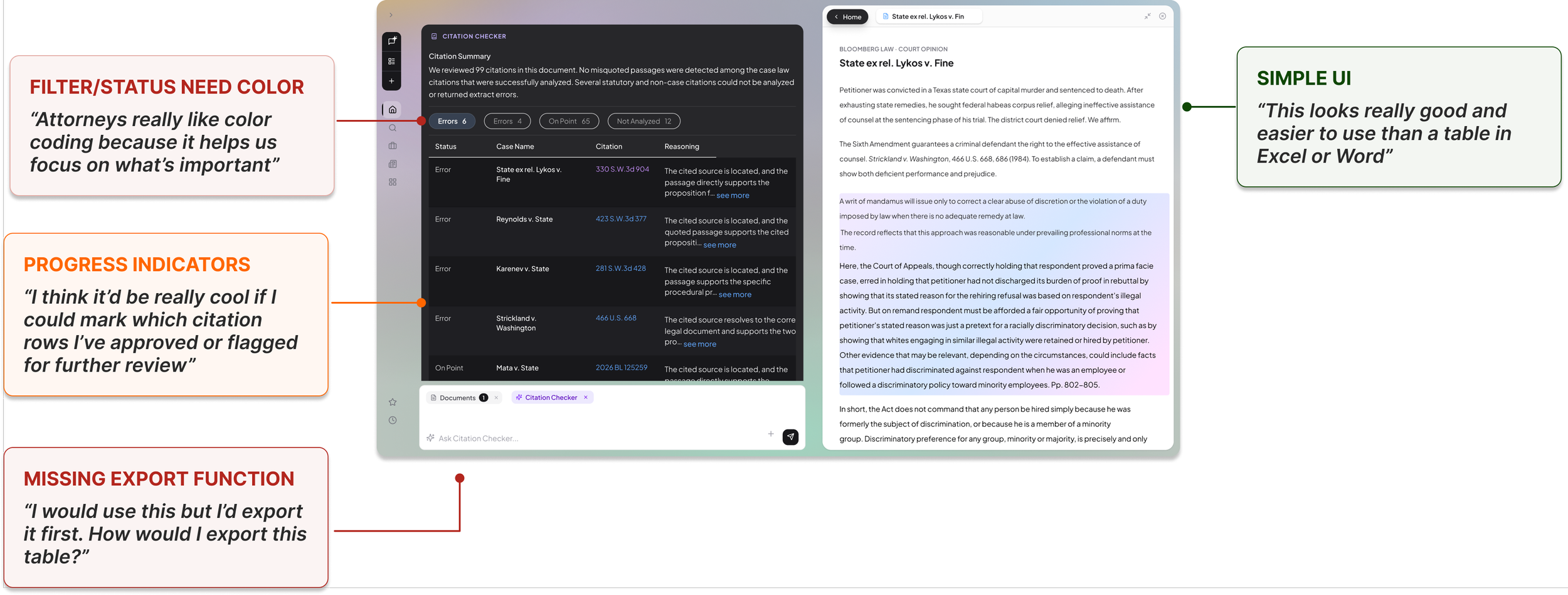
Simple UI
"This looks really good and easier to use than a table in Excel or Word."
Filter / Status Need Color
"Attorneys really like color coding because it helps us focus on what's important."
Progress Indicators
"I think it'd be really cool if I could mark which citation rows I've approved or flagged for further review."
Missing Export Function
"I would use this but I'd export it first. How would I export this table?"
The three comments that weren't feature requests.
They described how they'd used this agent and I picked up that reviewing the table isn't the end of their task. Correcting the document is which means they'd still have to cross-reference the table against the legal document. So this design was creating more work, not less.
I knew I was missing something, so I went back to the recording and listened for anything that wasn't about the table.
"Our attorneys really like Brief Analyzer's layout because you can view the document and analysis side by side. A lot of other legal tools don't do that."
Junior Associate
"Pretty interfaces mean nothing to some of our attorneys because it's easier to redline in Word or on a printed copy."
Senior Associate
"Many senior associates and partners will never go into this software and click through a table at all."
Legal Librarian
06 — The Revised Goal
How might we help users verify every citation without creating more friction?
It became clear that the better I made the table, the more I was optimizing an interface that shouldn't exist. I revised the goal around the three constraints that came out of that call. The opportunity is in the overlap.
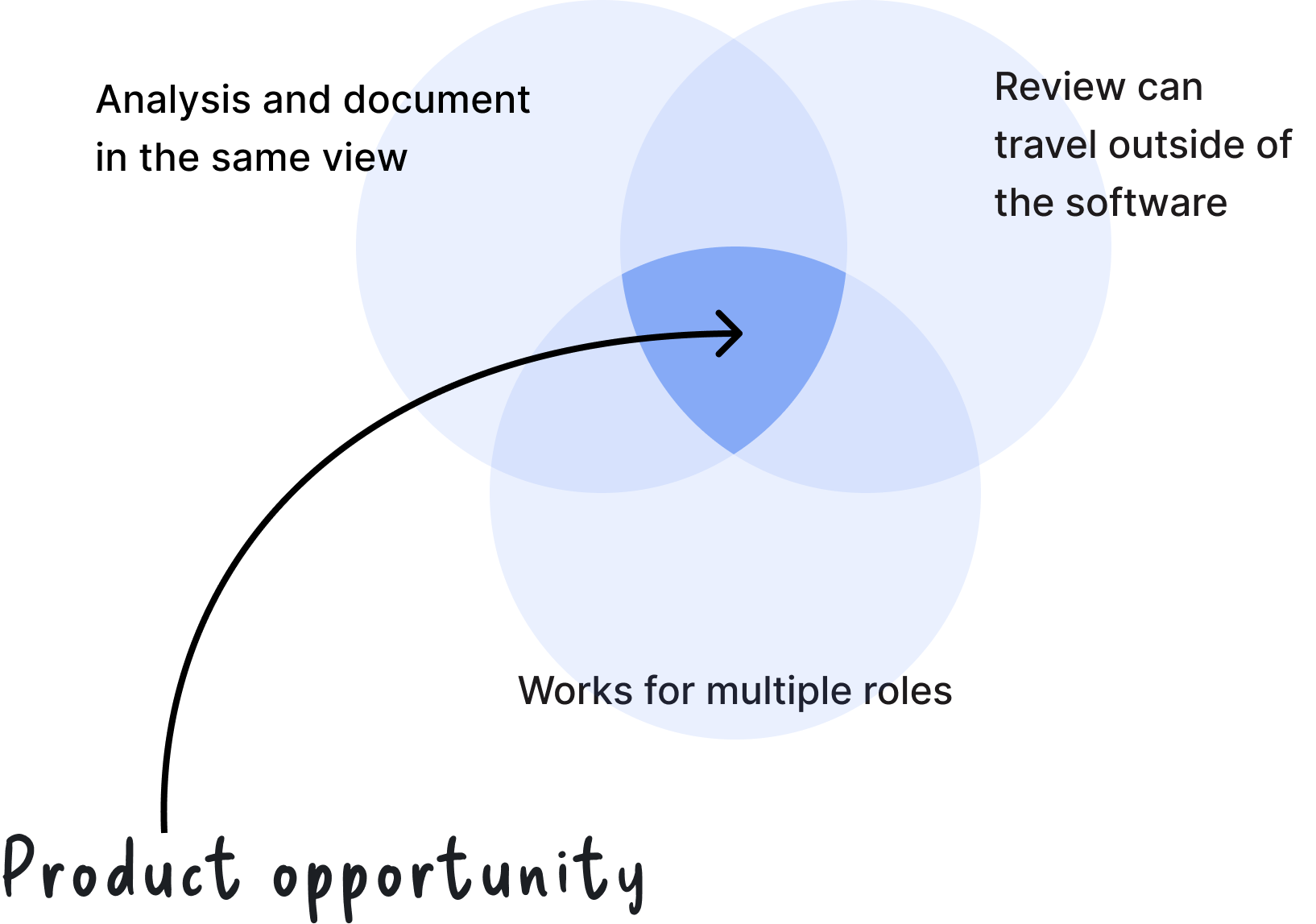
The Analysis and the Document Have to Be in the Same View
Attorneys need the document and the analysis within reach to verify a citation. Junior and mid-level associates told us they love the Brief Analyzer experience because of the side-by-side layout.
The Review Has to Travel Outside the Software
Attorneys redline in Word or on paper. The table organized the citations well, but it doesn't print, and it adds another touchpoint to the review process.
It Has to Work for Multiple Roles
Junior associates will click through a table and partners won't, because that isn't how they review work. The analysis has to reach both.
07 — The Solution
Instead of a table, the analysis lives on the document itself.
Document Viewer
Instead of a table, you upload your document and the analysis lives on it. Users can download and print this, so the review works inside the software and in hand.
Progress Indicators
I kept the category filter chips, so users can pinpoint errors right on the page. Citations are highlighted in place with the reasoning annotated beside them, and users can track which ones they've reviewed or flagged for a second look.
Side-by-Side
This is the part I care about most. You click through to the cited source and it opens alongside. Now the legal document, the cited source, and the annotation are all in one view. The cross-referencing step disappears.
08 — Retrospective
What I'd do differently.
We Could've Saved Time
Product managers are responsible for a tool's future scope, and sometimes their design is just how they're understanding the problem, not a vision of the solution. The PM thought a table was the best way to organize citations and surface errors. That was an assumption, and I inherited it as a spec.
Test as Early as Possible, Even When It's Rough
He wanted to polish the table before showing it to a customer, but the findings that changed everything came from the rougher version. If you can't get in front of a customer, find an SME or a former practitioner and ask them to imagine using it.
09 — Next Steps
Next steps.
This agent was designed in August 2026 so the team is planning their next steps.
Gather Feedback
I have buy-in and consensus from stakeholders, and we're gathering feedback from customers and attorneys at a legal conference in two weeks.
Mobile Experience
After that, mobile. This agentic experience needs to work on a phone, and I expect that constraint will sharpen the desktop version the way it did on the other project.
Explore how I led three research studies, interviewed 40+ attorneys, and a self-directed design sprint shaped Bloomberg Law's AI workspace strategy from a blank slate.